AI Yearbook Portrait
Your selfie,
professionally polished.
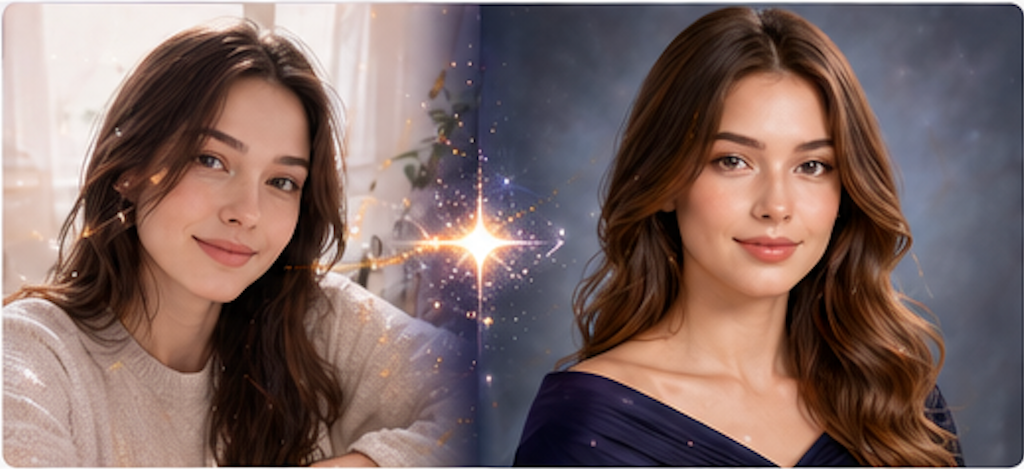
Transform a casual selfie into a stunning professional portrait. Choose from yearbook, corporate, and editorial styles.
How it works
From selfie to
studio portrait.
Image in, portrait out. No sign-up required to try.
- 01
Choose a portrait style
Pick from yearbook, corporate headshot, editorial, or classic black-and-white. Each gives a different professional feel.
- 02
Upload a clear front-facing photo
A well-lit selfie with natural daylight works best. Remove hats and sunglasses. PNG, JPG, or WEBP.
- 03
Let AI generate your portrait
The model creates a professional portrait with studio lighting, clean background, and polished composition—while keeping your identity.
- 04
Compare, download, and share
Drag the before/after slider. Download your new portrait to use on LinkedIn, yearbook, or anywhere you need a polished photo.
FAQ
Common questions.
Will I still look like myself?
Yes. The AI is instructed to keep your identity, face shape, and recognizable features. It enhances lighting, background, and polish—not your appearance.
Can I use this for a real yearbook or LinkedIn?
It gives a strong starting point. Check your school or organization guidelines for official photos. Many users find results professional enough for LinkedIn.
What kind of photo works best?
A well-lit front-facing selfie without hats, heavy filters, or extreme angles. Natural daylight near a window is ideal.
Can I do group photos?
This tool is optimized for single portraits. Upload one person per photo for best results.
Ready when you are