Premium Beauty Report

AI Beauty Diagnostic
Report.

Upload one clear portrait and create a full personal beauty plan before you run try-on or glow-up tools. The report is saved to your private workspace and costs 50 credits after success.

This premium report runs asynchronously. We reserve 50 credits, capture them only after a successful report, and release them if generation fails.
AI Beauty Diagnostic Report sample with portrait, scores, priorities, palette, and next tools

Loved by 5M+ BeautyLove users for hair, makeup, color, and portrait decisions.

5M+
Users worldwide
4.9 / 5
Average rating
2,689
User reviews

Sample report

See the report
before you run it.

This demo uses fixed sample data and does not call the API or use credits. Your private report will use your uploaded portrait and save to your workspace.

Sample portrait area

Sample report

AI Beauty Diagnostic Report

Soft Polished Natural

This sample report shows how BeautyLove connects visible face structure, feature balance, color direction, makeup priorities, hair framing, and photo quality into one practical beauty plan. The strongest direction is clean, softly lifted styling with warm-neutral color accents and natural portrait polish.

Readiness

86

out of 100

Season

Warm-neutral soft contrast

Neutral-warm impression

Best colors

Soft ivoryWarm roseMuted coralOlive taupeDeep teal

Use carefully

Icy grayBlue-whiteNeon pinkFlat black near the face

Diagnostic dimensions

Face Structure

Balanced length and cheek focus with a softly defined jawline. Face-framing choices should add gentle lift without over-sharpening.

84

Strengths

  • - Balanced visible proportions
  • - Soft cheek structure
  • - Natural jawline definition

Suggestions

  • - Try face-framing layers around cheekbone level.
  • - Avoid very flat center framing if the photo goal is lift.

Eye, Brow, Lip & Nose Balance

The feature balance works best with clean brow definition, softly lifted liner, and lip color that adds healthy contrast.

82

Strengths

  • - Natural eye focus
  • - Good brow-to-eye balance
  • - Lip shape suits soft color definition

Suggestions

  • - Use a soft arch or feathered brow direction.
  • - Keep liner lifted at the outer third instead of heavy all-around definition.

Skin Tone & Foundation Direction

A neutral-warm shade family and soft satin finish would likely look more natural than a very matte or overly cool base.

88

Strengths

  • - Warmth reads well in natural tones
  • - Soft complexion direction
  • - Good compatibility with rose-coral accents

Suggestions

  • - Swatch foundation near jaw and neck in daylight.
  • - Use shade family guidance instead of exact brand matching.

Makeup Priority

A small amount of eye lift, cream blush, and warm-neutral lip color creates the biggest visible improvement with the least effort.

86

Strengths

  • - Soft glam compatibility
  • - Natural blush placement
  • - Balanced lip emphasis

Suggestions

  • - Place blush slightly higher for lift.
  • - Use satin or balm finishes before trying very matte lips.

Hair Framing

Medium softness around the face is the safest direction. Warm brunette, soft caramel, or dimensional color notes could support the palette.

83

Strengths

  • - Face shape supports layered framing
  • - Warm color harmony
  • - Good room for part refinement

Suggestions

  • - Test soft side part or curtain framing.
  • - Avoid overly blunt heavy fringe without previewing first.

Jewelry & Outfit Palette

Warm metals, delicate rounded earrings, and warm-neutral clothing near the face are the easiest style upgrades.

85

Strengths

  • - Gold and rose-gold compatibility
  • - Soft structured accessories
  • - Muted accent colors

Suggestions

  • - Try small hoops or soft drop earrings.
  • - Use deep teal or warm rose as camera-friendly accent colors.

Profile Photo Readiness

The sample direction benefits from cleaner light, a simpler background, and subtle under-eye and smile polish before profile use.

80

Strengths

  • - Clear portrait potential
  • - Natural expression direction
  • - Good crop flexibility

Suggestions

  • - Improve light from the front-left or front-right.
  • - Use AI Glow-Up Studio when you want one finished polished image.

Confidence note

Sample only. A real report depends on your uploaded photo quality, lighting, angle, visible hair, skin tone, and current makeup.

BeautyLove reports are beauty and styling guidance from one photo. Lighting, camera angle, makeup, filters, and image quality can change the output. This is not medical, biometric identity, dermatology, or professional cosmetic advice.


Overview

What is AI Beauty Diagnostic Report?

AI Beauty Diagnostic Report helps turn one upload into a practical beauty decision. Generate a complete personal beauty diagnostic report covering face structure, features, color, makeup, hair, style, and profile-photo priorities. Use it when you want a focused result that connects the photo to the next styling or editing step.

Cost

50 credits

Charged only after a successful run.

Output

AI report

A structured result with practical notes.

Best photo

Clear portrait

Natural light usually gives the most useful result.

Use cases

When this tool
is worth running.

These examples help searchers and first-time users decide whether AI Beauty Diagnostic Report is the right tool for the photo they have.

01

Generate a complete personal beauty diagnostic report covering face structure, features, color, makeup, hair, style, and profile-photo priorities.

02

Get a focused result from one clear portrait.

03

Use the report to decide which visual try-on or editing tool should come next.

Workflow

From one upload to
a useful next move.

Each tool is built for a practical beauty decision: what to try, where to place it, or which direction to choose next.

  1. 01

    Upload one portrait

    A clear image lets the report read visible face structure, features, hair, skin tone, and photo quality signals.

  2. 02

    Create a private report job

    The report runs asynchronously and reserves credits while it builds the full diagnostic.

  3. 03

    Review and apply the plan

    Download the report, then use AI Glow-Up Studio or recommended tools to act on the priorities.

Photo tips

Better input,
better output.

  • Use a clear front portrait with visible face, hair, skin tone, and natural lighting. Avoid heavy filters or colored light.
  • Use natural light and avoid heavy filters when possible.
  • Keep the face, hair, or feature area relevant to the tool visible.
  • If the result feels uncertain, try a sharper front-facing photo.

Privacy & expectations

Useful guidance,
not overclaiming.

Photo first

Lighting, camera angle, makeup, hair, and filters can change the result. A clear original photo gives the most useful read.

Beauty use

AI Beauty Diagnostic Report is for styling, profile-photo, and creative beauty decisions. It is not medical, biometric, or identity advice.

Next step

Use the output as a practical direction, then compare it with related tools or a real mirror check before committing.

FAQ

Good to know.

What does AI Beauty Diagnostic Report include?

It covers visible face structure, feature balance, skin tone direction, makeup priorities, hair framing, jewelry and outfit palette direction, photo readiness, top priorities, and next tools.

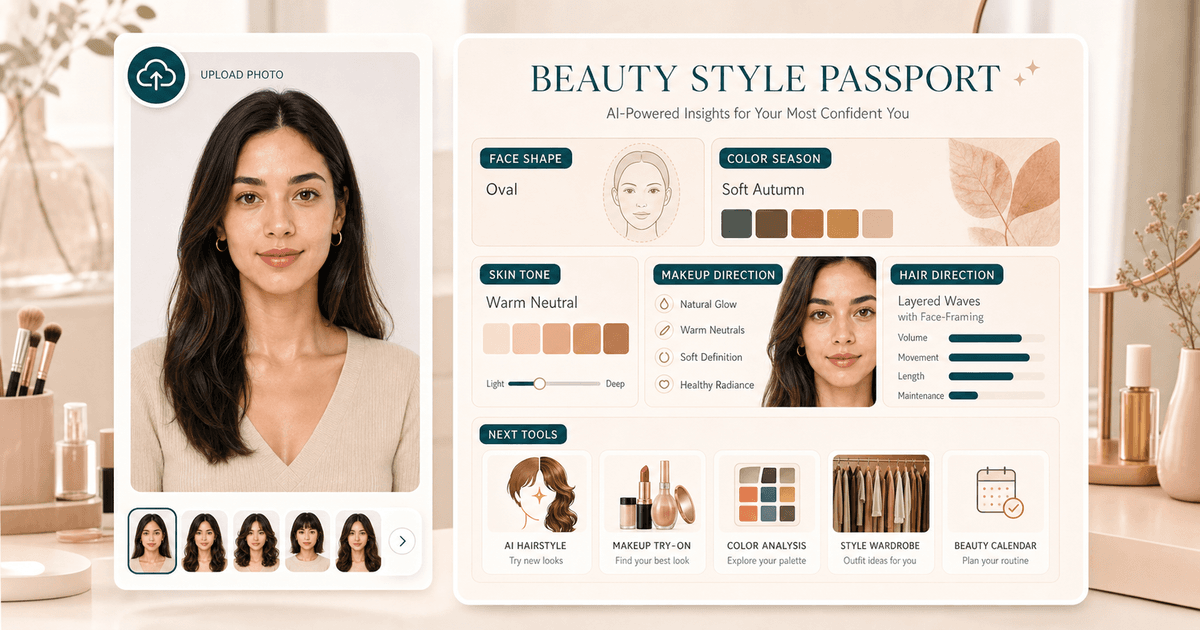
How is this different from Beauty Style Passport?

Beauty Style Passport is a lighter 20-credit report. AI Beauty Diagnostic Report is a deeper 50-credit private report designed to guide a full glow-up workflow.

Is the report public?

No. Real user reports are private workspace pages for the signed-in user and are not intended for search indexing.

Can I download the report?

Yes. The report page supports downloading the rendered report as an image or PDF.

Try the tool

Start with one photo,
then refine the whole look.

Upload a clear portrait, review the result, and follow the next-step tools when you want a more complete beauty workflow.