AI Occasion Styling
Event Look
Builder.
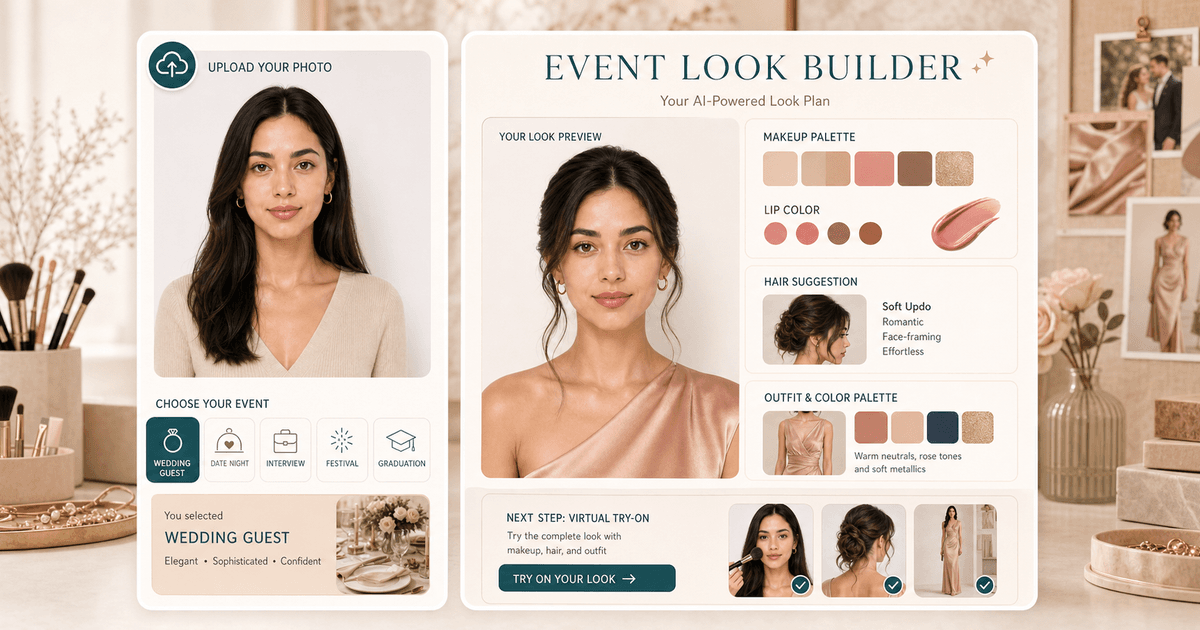
Choose a scene, upload a portrait, and get a coordinated makeup, hair, lip, color palette, and next-tool plan for the event.
Choose event
5 options available. Selected: Wedding guest
Overview
What is Event Look Builder?
Event Look Builder is for users who know the occasion before they know the makeup or hair. It combines event context, color direction, makeup focus, lip shade, hair framing, and portrait polish into one look plan, then points users to try-on tools when they want a visual preview.
Cost
10 credits
Charged only after a successful run.
Output
AI report
A structured result with practical notes.
Best photo
Clear portrait
Natural light usually gives the most useful result.
Use cases
When this tool
is worth running.
These examples help searchers and first-time users decide whether Event Look Builder is the right tool for the photo they have.
Build a wedding guest, date night, interview, festival, or graduation beauty direction from one portrait.
Coordinate makeup, lip color, hair, and outfit palette so the look fits one occasion.
Use the written plan as a shopping, salon, or try-on checklist before the event.
Workflow
From one upload to
a useful next move.
Each tool is built for a practical beauty decision: what to try, where to place it, or which direction to choose next.
- 01
Choose the occasion
The same face can need a different look for an interview, wedding, festival, date, or graduation.
- 02
Upload one portrait
Visible face, hair, and coloring help the plan feel personal rather than generic.
- 03
Follow the build list
Use the result to try makeup, lipstick, hair color, or hairstyle tools next.
Photo tips
Better input,
better output.
- Use a portrait with visible face, hair, and skin tone so the look can match your features.
- Choose the real event context, because interview and festival looks should not optimize for the same signals.
- Treat product suggestions as shade families, not exact brand matches.
- Open makeup, lipstick, hair, or color tools after reading the plan.
Next tools
Build a fuller
beauty workflow.
Most users get better results by pairing one focused tool with the next logical analysis, try-on, or portrait polish step.
Virtual Makeup Try-On
Try natural glow, soft glam, K-beauty, bridal, smoky eye, and red carpet makeup looks on your own photo.
Open tool
Virtual Lipstick Try On
Preview matte, satin, glossy, nude, berry, red, brown, and coral lip colors before you buy.
Open tool
AI Hairstyle Changer
Preview different hairstyles on your photo with AI before the salon.
Open tool
Outfit Color Palette Builder
Turn visible color analysis cues into outfit palettes, neutrals, accent colors, and avoid lists.
Open toolPrivacy & expectations
Useful guidance,
not overclaiming.
Photo first
Lighting, camera angle, makeup, hair, and filters can change the result. A clear original photo gives the most useful read.
Beauty use
Event Look Builder is for styling, profile-photo, and creative beauty decisions. It is not medical, biometric, or identity advice.
Next step
Use the output as a practical direction, then compare it with related tools or a real mirror check before committing.
FAQ
Good to know.
What events are supported?
Wedding guest, date night, interview, festival, and graduation are included first.
Does it generate a final image?
No. It creates a written look plan and links you toward try-on tools for visual previews.
How many credits does it use?
A successful Event Look Builder run uses 10 credits.
Try the tool
Start with one photo,
then refine the whole look.
Upload a clear portrait, review the result, and follow the next-step tools when you want a more complete beauty workflow.
Loved by 5M+ BeautyLove users for hair, makeup, color, and portrait decisions.