AI Profile Photo Decision
Multi-Photo
Profile Picker.
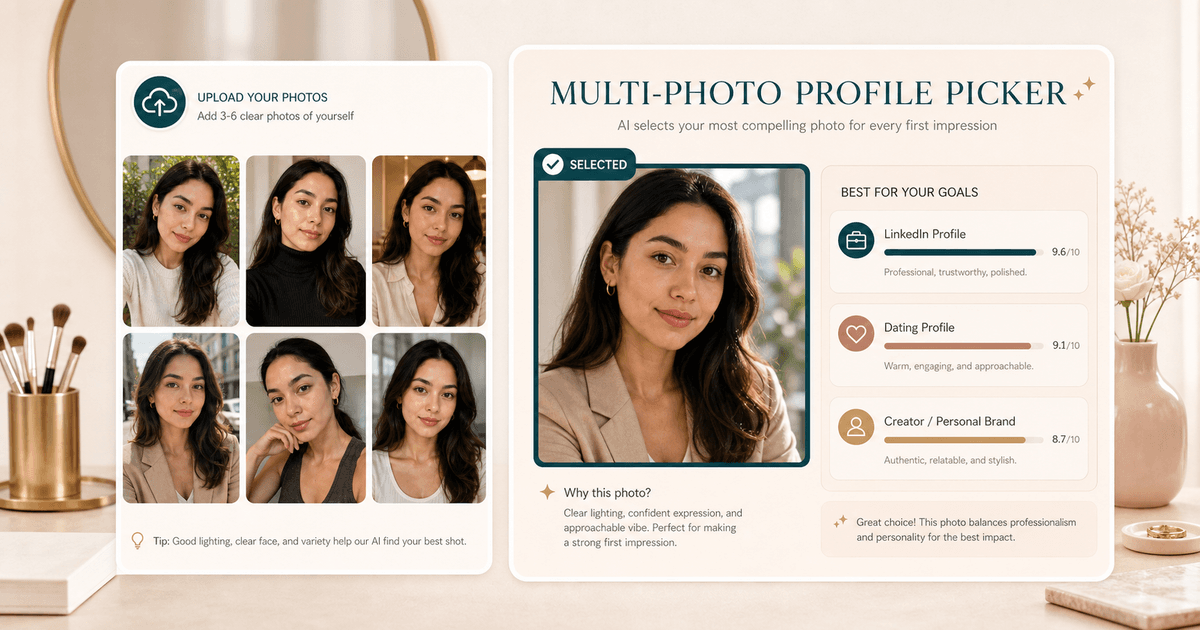
Upload 3 to 6 portraits and let AI pick the strongest profile photo for LinkedIn, dating, or creator use based on lighting, expression, crop, clarity, and goal fit.
Workflow
Compare the set,
not just one selfie.
- 01
Choose your goal
LinkedIn, dating, and creator profiles reward different signals.
- 02
Upload 3 to 6 photos
Use real candidates rather than near duplicates for a more useful decision.
- 03
Review the pick
Get a selected image, ranking scores, and practical notes for the runner-up photos.
Use cases
When the set
matters more.
Single-photo scoring is useful, but profile choices often come down to comparison. This tool is for choosing between real candidates.
Choose one LinkedIn photo from several similar headshots when expression, crop, and background all feel close.
Compare dating profile candidates for approachability, authenticity, clarity, and conversation value.
Pick a creator profile image that reads clearly as a thumbnail and still feels personal.
Photo set tips
Better candidates,
better decision.
- Upload real candidates, not six near duplicates from the same burst.
- Mix lighting, crop, outfit, expression, and background so the comparison has meaningful differences.
- Avoid group shots, heavy filters, screenshots, and photos where the face is too small.
- Use Photo Quality Score first if one image is blurry, dark, or poorly cropped before comparing the set.
Next tools
Polish the winner,
not every photo.
After the picker selects a winner, use focused tools to fix quality, color, or platform fit instead of editing the whole set.

AI Photo Quality Score
Score composition, exposure, and sharpness to decide whether a portrait is ready for profiles or social posts.
Open tool
Portrait Color Enhancer
Enhance portrait color and lighting balance for warmer, cleaner, more post-ready images.
Open tool
LinkedIn Photo Score
Score one photo for LinkedIn readiness using lighting, crop, expression, background, and professional polish.
Open toolFAQ
Good to
know.
How many photos should I upload?
Upload 3 to 6 portrait options. The tool needs at least 3 to make a meaningful comparison.
Is this the same as Photogenic Score?
No. Photogenic Score reviews one image. This tool chooses the best image from a set for a specific goal.
How many credits does it use?
A successful Multi-Photo Profile Picker run uses 10 credits.
Loved by 5M+ BeautyLove users for hair, makeup, color, and portrait decisions.