AI Makeup Placement
Blush, Bronzer
Contour Map.
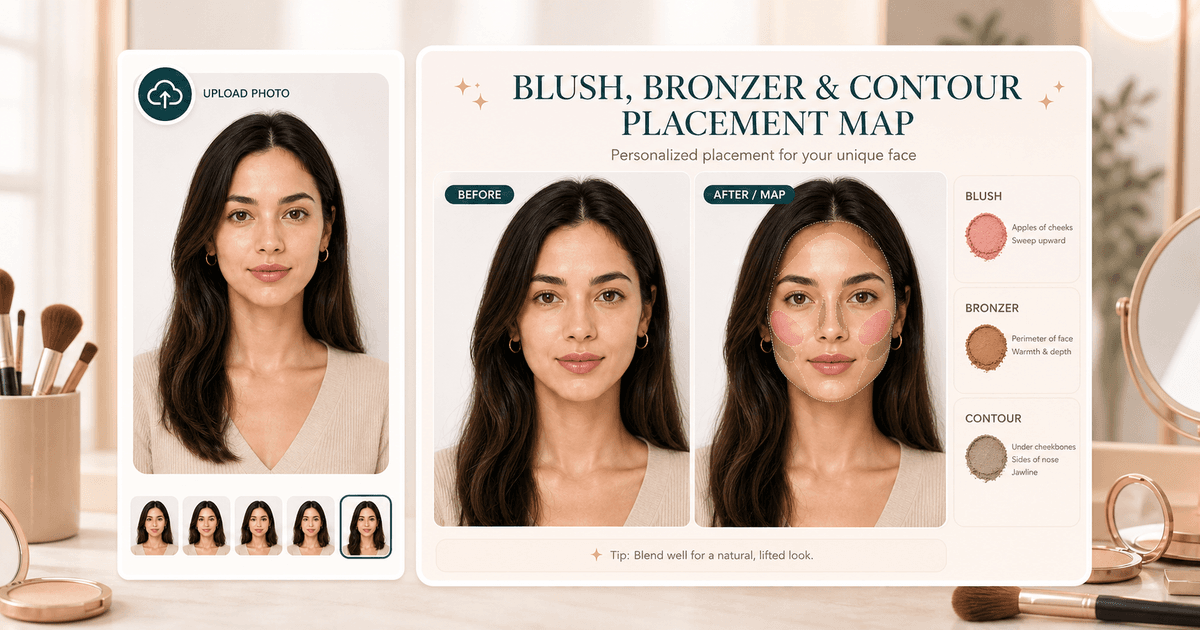
Upload a portrait and generate a soft overlay that suggests where blush, bronzer, and contour could sit for your face shape.
Choose placement goal
12 options available. Selected: Lifted everyday
Overview
What is Blush, Bronzer & Contour Placement Map?
Blush, Bronzer & Contour Placement Map is for users who already know they want makeup direction, not another face shape label. It creates a subtle visual overlay so placement choices can follow cheek fullness, jawline, face length, and the lift or softness you want.
Cost
20 credits
Charged only after a successful run.
Output
Preview image
A visual before-and-after result.
Best photo
Clear portrait
Natural light usually gives the most useful result.
Use cases
When this tool
is worth running.
These examples help searchers and first-time users decide whether Blush, Bronzer & Contour Placement Map is the right tool for the photo they have.
Preview lifted blush, soft bronzer, and contour zones before doing makeup for photos or events.
Translate face shape and cheek structure into a practical visual placement map.
Compare natural, lifted, balanced, or cheekbone-focused placement without committing product to the face.
Workflow
From one upload to
a useful next move.
Each tool is built for a practical beauty decision: what to try, where to place it, or which direction to choose next.
- 01
Choose a placement goal
Pick an everyday, face-balance, or event placement preset before uploading.
- 02
Upload one portrait
Visible cheeks and jawline help the generated overlay sit in the right areas.
- 03
Compare the map
Use the before and after slider to inspect blush, bronzer, and contour zones.
Photo tips
Better input,
better output.
- Use a front-facing portrait with cheeks, jawline, and forehead visible.
- Keep hair, hands, and high collars away from the cheek and jaw area.
- Start with Natural map or Lifted everyday if you want a safer first result.
- Use Face Shape Detector first if you need the structure read before placement.
Next tools
Build a fuller
beauty workflow.
Most users get better results by pairing one focused tool with the next logical analysis, try-on, or portrait polish step.

Face Shape Detector
Detect your face shape with AI.
Open tool
Jawline Analyzer
Double chin, jawline definition, contouring-friendly notes.
Open tool
Virtual Makeup Try-On
Try natural glow, soft glam, K-beauty, bridal, smoky eye, and red carpet makeup looks on your own photo.
Open tool
Event Look Builder
Choose an event and get a coordinated makeup, hair, lip, color palette, and try-on plan.
Open toolPrivacy & expectations
Useful guidance,
not overclaiming.
Photo first
Lighting, camera angle, makeup, hair, and filters can change the result. A clear original photo gives the most useful read.
Beauty use
Blush, Bronzer & Contour Placement Map is for styling, profile-photo, and creative beauty decisions. It is not medical, biometric, or identity advice.
Next step
Use the output as a practical direction, then compare it with related tools or a real mirror check before committing.
FAQ
Good to know.
Is this a makeup filter?
It is a placement guide overlay, not a full glam makeover.
Can I follow the map exactly?
Use it as a starting point, then soften or move placement based on your products, brush size, and mirror lighting.
How many credits does it use?
A successful placement map generation uses 20 credits.
Try the tool
Start with one photo,
then refine the whole look.
Upload a clear portrait, review the result, and follow the next-step tools when you want a more complete beauty workflow.
Loved by 5M+ BeautyLove users for hair, makeup, color, and portrait decisions.